ZPPINN4D Product Introduction
Physics-AI workflow software for geometry setup, PINN training, prediction, and result review.
ZPPINN4D is a multi-physics PINN software stack for engineering simulation and Physics AI workflows. The product connects geometry preparation, material and region setup, boundary and initial condition definition, sampling, training, prediction, and result review in one working line.
The current product fit is controlled-scope engineering validation, pre-sales demonstration, and joint development on verified physics lines where condition changes, reference data, and repeated comparison runs matter.
Workbench preprocessing and project setup
Prepare the engineering object in a desktop workbench before solver execution starts.
- Geometry import or basic geometry creation
- Region, material, boundary, and initial-condition setup
- Sampling preview, project save, reopen, and export
PINN training and prediction workflow
Run solver-ready YAML workflows that cover training, prediction, model reload, and result export on controlled physics lines.
- Standard PINN training and prediction
- Multi-stage training and model save/load
- CPU and GPU execution paths
Reference-data and parametric study support
Use verified reference data and repeated condition updates to build faster comparison loops on the same case family.
- Physics-constrained and data-enhanced training
- Condition updates across verified workflows
- Deviation metrics and result comparison artifacts
Automation and delivery surfaces
Move stable workflows from the desktop UI into Python or CLI execution when a team needs scripted preprocessing, batch runs, or regression-style reuse.
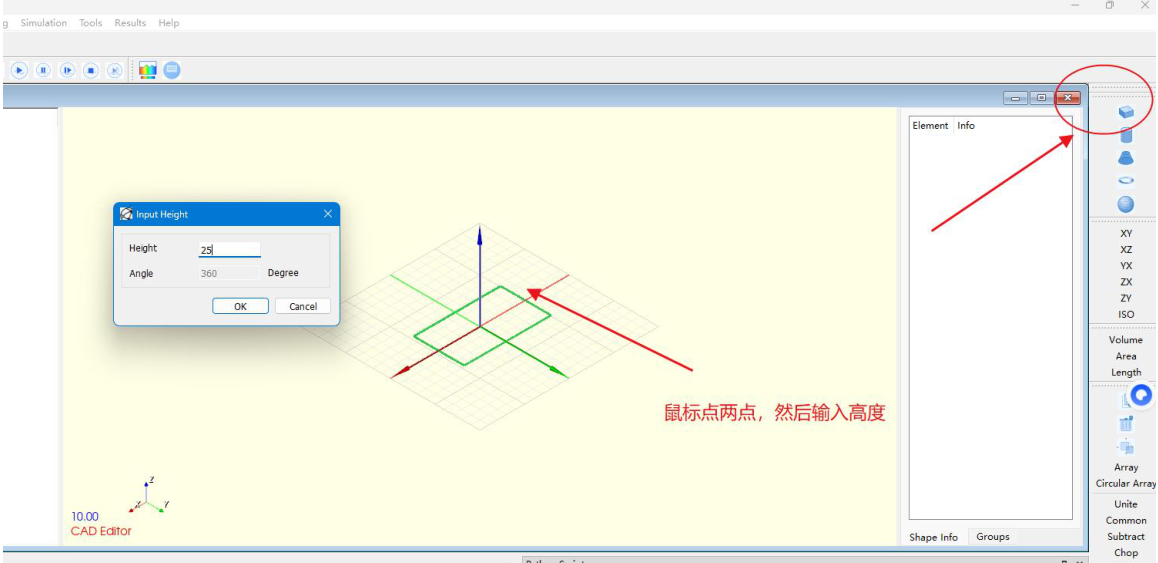
Geometry workspace
The workbench starts from a geometry view where model construction and simulation-oriented setup remain connected.
Import or create geometry, define regions, assign materials, and set the target physics line.
Configure boundary conditions, initial conditions, and sampling settings for the target workflow.
Generate solver-ready configuration, then launch training or prediction through the desktop product or automation entry points.
Inspect VTK, CSV, and log outputs, then update conditions or network settings for the next comparison cycle.
Shaft steady thermal case with Abaqus reference data
The thermal route changes the left-end fixed temperature from 100 to 60 while keeping the right-end side at 200, then predicts the new temperature field directly from the trained PINN workflow.
- Reference
- Abaqus
- Compare points
- 1012
- Total sample points
- 119128
- RMSE
- 6.7313
- Relative L2
- 0.0442989
- Correlation
- 0.998811
Ribbed-structure modal case on imported geometry
The strongest structural showcase is the modal line on imported solid geometry, where the same object is reused across multiple Young's modulus settings and compared at the current 2.15e11 case.
- Reference
- Abaqus
- Compare points
- 914
- Training setups
- 1.9e11 / 2.05e11 / 2.2e11
- Current setup
- 2.15e11
- RMSE
- 0.00131064
- Correlation
- 1
3D square-cylinder wake flow with Fluent rerun timing
This route uses the same point cloud and the same three time slices to compare a new outlet-pressure case after the PINN model has been trained on earlier Fluent runs.
- Reference
- Fluent
- Pressure setups
- 0 / 25 / 50 / 75 -> 100
- Compare points
- 2940 x 3 = 8820
- Velocity RMSE
- 0.0442462
- Fluent rerun
- 136.233879 s
- PINN predict
- 1.059377 s
HFSS connector prediction and parameter-response route
The current EM showcase works on a connector object with air, dielectric, and copper conductors. It already covers same-point training, same-point prediction, and a separate timing route for changed material conductivity.
- Reference
- HFSS
- Frequency
- 2.5e9 Hz
- Compare points
- 128
- Amplitude case RMSE
- 759.173
- Amplitude case Relative L2
- 0.365804
- Conductivity timing
- 18.346324 s vs 1.841931 s