FasCAD Product Introduction
Desktop CAD for geometry creation, inspection, revision, and automation.
FasCAD is a desktop CAD product for engineering teams that need direct geometry work inside a practical working environment. The product combines object creation, editing, inspection, exchange-format support, revision tools, AI dialog, and Python execution in one desktop context.
It fits workflows where geometry has to be built, checked, modified, and prepared for downstream engineering work without splitting the operator across disconnected tools.
Geometry creation and editing
Build and revise geometry with direct modeling operations used in day-to-day mechanical and industrial geometry work.
- Extrude, revolve, sweep, loft
- Shell, split, offset, array, mirror
- Boolean, fillet, chamfer, scale
Model inspection and review
Inspect the active model while changes are still being made, so quality checks stay close to the geometry revision process.
- Measurement and object properties
- Collision and geometry checks
- Curvature, zebra, draft, thickness, minimum-radius analysis
Exchange-format workflows
Keep the same geometry useful across import, review, cleanup, redesign, and downstream engineering preparation.
- STEP
- IGES
- STL
- BREP
Revision control and automation
Use feature history, lightweight parametric control, Python scripting, and AI-facing entry points for repeated geometry work and product-level automation.
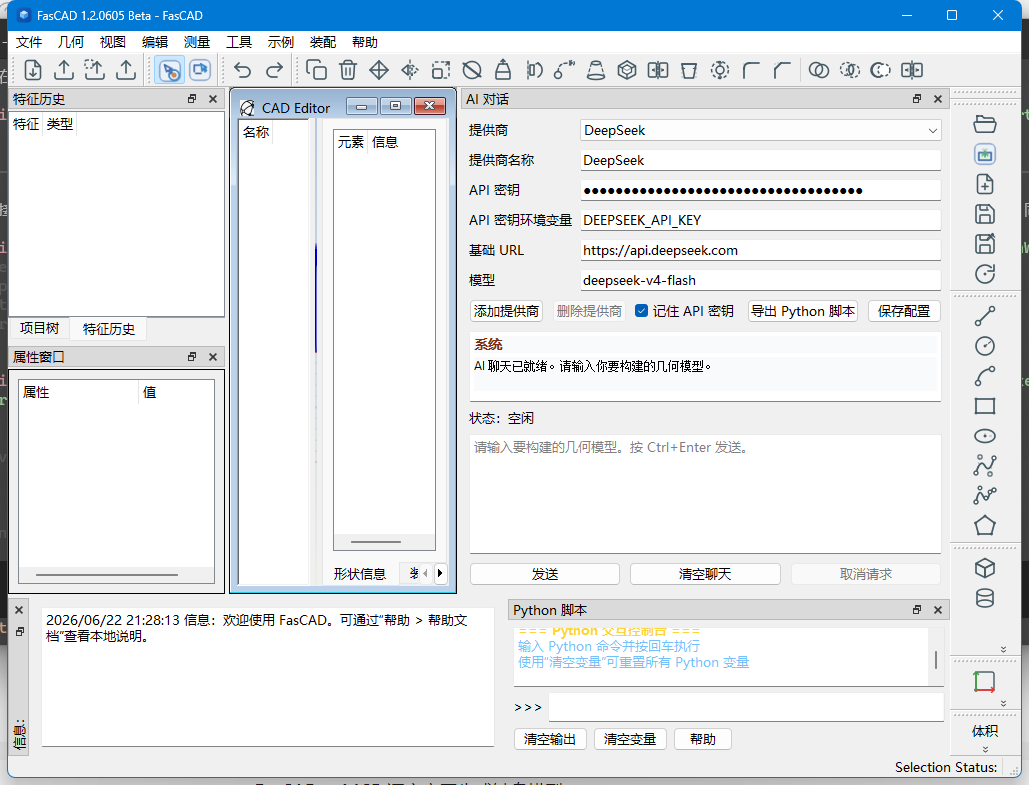
Workspace overview
The main window keeps geometry editing, project trees, property views, AI dialog, and Python execution in one desktop context.
Start from native construction or bring in external CAD data for revision and preparation.
Apply geometry operations and run checks while the model remains active in the workspace.
Use feature history and lightweight parametric control to manage repeated design changes.
Use Python and automation entry points for repeated geometry tasks, export steps, and batch execution.